Pinterest ad campaigns are one of our favorite ways to help small business owners reach their audience and grow their sales. We are seeing some truly incredible results with our ad management service right now!
But here’s the catch: simply throwing up an ad and hoping for the best won’t cut it. If you want real results—whether that’s brand awareness, website traffic, or direct sales—you need a strategic approach. In this post, I’ll walk you through exactly how to create compelling Pinterest ad campaigns that convert, even if you’re new to the platform.
1. Start with a Clear Goal
Before you even think about designing an ad, you need to know what you’re trying to achieve. Pinterest Ads offer several campaign objectives, including:
- Brand Awareness – Getting your business in front of new people. If your business is new to Pinterest or you’re launching a new product, a Brand Awareness campaign can help introduce your brand to the right audience. Here’s how it helps:
- Increases exposure to potential customers who may not know your brand yet.
- Builds trust and familiarity, making future ads more effective.
- Puts your content in front of more people at the top of the funnel.
- Consideration (Traffic) – Driving visitors to your website. If your goal is to get more people to visit your website—whether that’s a blog post, landing page, or product page—Traffic campaigns are the way to go. How this helps:
- Increases site visits from engaged users who are actively searching for inspiration.
- Helps you grow your email list by sending visitors to a lead magnet or freebie.
- Warms up potential customers by introducing them to your content and offers.
- Conversions – If you’re ready to turn Pinterest users into paying customers, a Conversions campaign focuses on getting people to take a specific action—whether that’s making a purchase, signing up for a webinar, or filling out a contact form. Here’s how it helps:
- Targets people who are more likely to take action.
- Uses Pinterest’s algorithm to optimize for purchases, not just clicks.
- Helps increase return on ad spend (ROAS) by focusing on bottom-of-the-funnel users.
- Catalog Sales – Showcasing multiple products in a shoppable format. If you have an e-commerce store with multiple products, Catalog Sales campaigns allow you to promote your entire inventory in a dynamic, shoppable format. Here’s how it helps:
- Automatically pulls from your product catalog, saving you time.
- Shows different products to different users based on their interests and behaviors.
- Works great for retargeting past visitors with relevant product recommendations.
Your goal will determine everything—from the type of ad you create to the way you measure success. If you’re just starting out, focus on Traffic or Conversions, as these provide direct results you can track and optimize.
2. Choose the Right Ad Format
Pinterest offers a variety of ad types, and picking the right one is key to running a successful campaign.
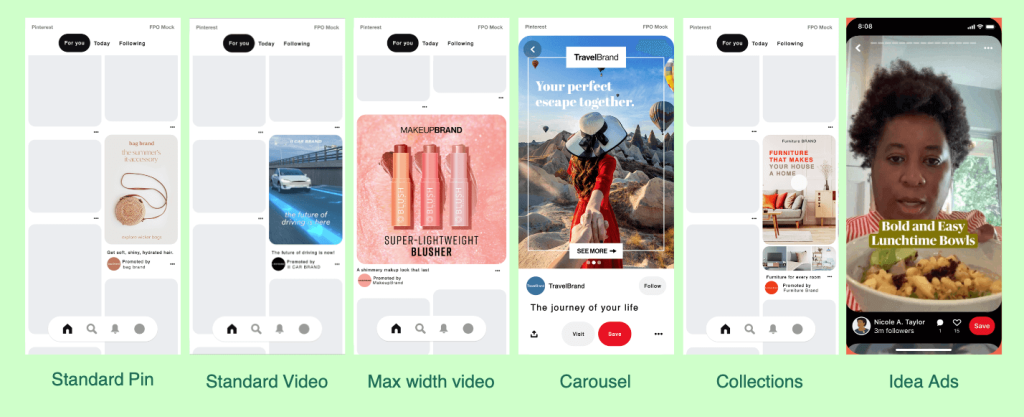
- Standard Pins – These look just like regular Pins but are promoted for greater reach. Great for blog content, lead magnets, or product awareness.
- Video Pins – Perfect for catching attention quickly. Short, engaging videos work best—think 3-6 seconds of movement that intrigues people to click.
- Carousel Ads – These feature multiple images in a swipeable format. Great for telling a brand story or showcasing different product angles.
- Shopping Ads – These automatically pull from your product catalog, making it easy to showcase your store’s inventory.
- Idea Ads – Pinterest’s take on Stories, these full-screen, multi-page ads allow for a more interactive experience.
Each format has its strengths, but for most businesses, Standard Pins, Video Pins, and Shopping Ads perform best.
3. Make Your Pin Stand Out
Pinterest is a visual-first platform, so if your ad doesn’t grab attention instantly, it’s going to get scrolled past. Here’s how to make your ads pop:
- Use High-Quality Images & Video – Crisp, bright, and vertically oriented (2:3 ratio, 1000 x 1500 px) for best performance. Video performs better than static images, so try and incorporate it in your ads.
- Add Text Overlay – A simple, clear headline helps people understand your offer at a glance. Use large, readable fonts.
- Stay On-Brand – Stick to your brand’s colors and style so your Pins feel cohesive and recognizable.
- Use Faces & Lifestyle Shots – People connect with people! Show your product in use rather than just a static image.
- Keep It Simple – Avoid clutter. A clean, focused design will perform better than something overly busy.
Pinterest even recommends using warm colors and minimal white space, as these tend to perform better in the feed.
4. Write a Click-Worthy Pin Description
Your ad’s description is where you convince someone to take action. Don’t just stuff it with keywords—make it engaging!
Instead of:
🚫 “Buy our handmade candles, perfect for gifts. 100% soy wax. Free shipping.”
Try:
✅ “Looking for the perfect cozy gift? Our 100% soy candles fill your space with the dreamiest scents—plus, they ship free!”
A great description should:
🔹 Highlight a benefit (Why should they care?)
🔹 Use natural, conversational language (Not overly salesy!)
🔹 Include relevant keywords (Helps Pinterest show it to the right people)
🔹 Have a clear CTA (Shop now, Learn more, Try it today, etc.)
Pinterest allows up to 500 characters, but only the first 50-60 characters show up in the feed—so make the first sentence count!
5. Target the Right Audience
Even the best ad won’t perform if it’s shown to the wrong people. This is where it’s important to know your customer and understand the buyer journey. Pinterest lets you target based on:
- Interests & Keywords – People searching for specific topics or browsing relevant categories.
- Demographics – Age, gender, location, and device type.
- Actalike Audiences – Similar to Facebook’s Lookalike Audiences, these target users similar to your best customers.
- Retargeting – Show ads to people who’ve visited your site or engaged with your Pins.
Pro Tip: Keyword targeting is crucial on Pinterest. Think like your ideal customer—what would they search for? Use a mix of broad, niche, and long-tail keywords (e.g., “fall outfit ideas” vs. “casual fall outfit with boots”).
6. Set a Smart Budget
Pinterest Ads can work with any budget, but knowing how to allocate your spend is key. Pinterest offers two types of budgets: daily budgets and lifetime budgets. Understanding the difference between them will help you choose the best option for your campaign goals.
- Daily Budget – The amount you’re willing to spend per day on your campaign. This option is best for evergreen campaigns and testing ads before scaling.
- Lifetime Budget – A lifetime budget is best when you have a fixed budget for a specific time period and want Pinterest to automatically distribute your spend for the best performance. This works best for sensitive promotions, product launches and seasonal ads.
A few other tips for setting a budget:
💰 Start with at least $10-20/day to gather enough data.
💰 Run the ad for at least 14 days before making major adjustments. It takes a few weeks for Pinterest to test audiences and ad lift, you need to give it time to work.
💰 Increase spend on what’s working (Look for CTR > 1% and Conversion Rate > 2%).
Pinterest’s auction system means higher bids get better placements, but don’t worry—starting low and adjusting as you go is the best strategy.
7. Track & Optimize for Better Results
Once your campaign is live, keep an eye on Pinterest Analytics to see what’s working (and what’s not).
Key metrics to track:
📌 CTR (Click-Through Rate) – Are people clicking your ad? Aim for at least 1%.
📌 Conversion Rate – If you’re running a sales-focused campaign, this tells you how well your ad is turning clicks into purchases.
📌 Saves & Engagement – Even if someone doesn’t buy immediately, saves indicate strong intent.
If your ad isn’t performing, tweak things:
🔹 Test new images or headlines to see what grabs attention.
🔹 Adjust your targeting – Maybe your audience is too broad or too narrow.
🔹 Refine your keywords – Are you using terms your ideal customers actually search for?
Why Pinterest Ads Are Worth It
As we are a Pinterest marketing agency, we would be remiss if we didn’t put in a good plug for Pinterest ads! The beauty of Pinterest is that ads have a long shelf life. Unlike Facebook or Instagram, where ads disappear when your budget runs out, Pinterest Ads continue to get engagement even after they’re done running. While, Pinterest isn’t the perfect fit for every business, most businesses find the ads are more affordable and have a better ROI. Here are some resources to help you understand more about what Pinterest ads can do for your business:
If you put in the effort to create high-quality visuals, strategic targeting, and engaging copy, Pinterest can be one of the most cost-effective ways to drive traffic and sales.

🚀 Ready to get started? Take these tips and start experimenting with your first campaign! If you need expert help, I’d love to chat—let’s make Pinterest work for you.